
Learn how to send offline conversions to OpenAI Ads to improve attribution, reporting, and optimisation.
OpenAI’s advertising business has moved faster than almost anyone expected. Within six weeks of the US pilot going live, OpenAI’s ad revenue had already crossed $100 million on an annualised basis, and reports from the Information and Axios suggest OpenAI is now forecasting somewhere in the region of $2.4 billion in ad revenue for 2026, rising towards $100 billion by 2030.
Whatever you think about ads showing up inside ChatGPT, this is quickly becoming a source marketing teams need to take seriously.
Which brings us to a question we’ve been asked a lot in the last few months, in conversations with marketers who are already testing the platform. How do you actually prove that ChatGPT ads are driving real business results, rather than just clicks and impressions? The answer, more often than not, comes back to offline conversions.
In this post we’ll walk through why offline conversion tracking matters for OpenAI Ads, where the gap in native tracking currently sits, and how to send offline conversion data back into OpenAI using first-party tracking.
💡 Pro tip
If you’d rather see this in action than read about it, we’re happy to show you exactly how Ruler connects your calls, forms and CRM data to OpenAI Ads. Book a demo and we’ll walk through your setup with you.
Why offline conversions matter for OpenAI Ads
The reporting inside Ads Manager Beta currently covers the basics you’d expect, impressions, clicks, spend, click through rate, average CPC and average CPM, along with a conversion metric where measurement has been set up. That’s a reasonable starting point, but it leans heavily on what happens in the browser.
The trouble is that many of the enquiries and sales that matter most to a business never happen in a browser at all. Someone sees an ad in ChatGPT, clicks on it, and weeks later picks up the phone and speaks to your sales team.
Someone else fills in a form, gets a call from your team, and doesn’t actually become a customer for another six weeks, once the contracts have been signed. None of that activity is visible to a standard on-page pixel, yet it’s often where the real revenue lies.
From the leads we’ve tracked across hundreds of businesses running paid media, the highest value conversions are consistently the ones that take longest to happen and involve the fewest online steps.
This is exactly the gap that offline conversion tracking is built to close. Rather than relying on the pixel alone to tell OpenAI what happened after the click, offline conversion tracking sends verified, first-party data, calls, CRM stage changes, closed deals, back into OpenAI’s Conversions API. That gives the platform something far more useful to optimise against than a vanity metric like a form submission or a page view.
It also matters for a more practical reason. OpenAI has said its Conversions API is a more reliable measurement source than the pixel on its own, because server-side events aren’t affected by ad blockers, cookie restrictions or browser level privacy settings in the way client-side tracking is.
As third-party cookies continue to decline and consent requirements tighten, first-party offline data isn’t just a nice to have. It’s quickly becoming the only dependable way to prove what your ad spend is actually doing.
The offline conversion gap in OpenAI Ads
Based on the conversations we’re having with marketers right now, and verified against what we’re seeing in the OpenAI Ads documentation, the offline conversion gap breaks down into a few distinct problems.
The pixel only sees what happens on your website. OpenAI’s standard JavaScript pixel is genuinely useful for tracking on-page events such as page views and completed orders. However, once a customer picks up the phone, walks into a showroom, or replies to a follow-up email from your sales team, the pixel has nothing left to track. That conversion effectively disappears from OpenAI’s reporting, even though the ad click that started the journey is sitting right there in the data.
Long consideration windows break simple attribution. Few people make an important purchasing decision in a single sitting. They’ll see an ad, research the product across several sessions, compare it with competitors, read reviews, and eventually convert, often through a completely different channel to the one that first caught their attention. If your measurement only credits the last click or the last visible session, the upper funnel activity that actually built the intent gets none of the credit. This isn’t unique to OpenAI Ads, it’s the same challenge marketers have faced with every platform, but it’s especially pronounced with a new channel where consideration behaviour is still being understood. It’s one of the reasons 44% of marketers we’ve surveyed say cross-channel journeys, both online and offline, as a genuine challenge for effective attribution.
Platform reporting doesn’t reconcile with reality. OpenAI, Google, Meta and LinkedIn will each report their own version of what converted, measured within their own attribution window and their own rules. Add those numbers together across platforms and they’ll almost always exceed your actual sales figures. None of the platforms are necessarily wrong, they’re each just reporting from their own vantage point. The risk is when budget decisions get made off the back of those individual reports instead of a single, CRM verified source of truth.
None of this means OpenAI’s measurement tools are lacking for what they are, and the platform is clearly aware of the gap too. Coverage of the ChatGPT ads rollout has noted that a proper conversion tracking pixel is one of the most requested features from advertisers in the pilot, precisely because impression and click data alone doesn’t tell you whether the traffic actually turned into business.
It simply means that if you want a complete picture, offline conversion data needs to be part of your OpenAI Ads setup from the start.
How to send offline conversions to OpenAI with first-party tracking
The good news is that OpenAI has already built the infrastructure to make this possible. Through its Conversions API, advertisers can send server-side events, including offline conversions, directly back to the platform, matched to the original ad interaction. What’s needed is a reliable way to capture those offline events in the first place, and to match them accurately back to the right campaign, ad group and keyword.
Here’s how we’ve seen that work in practice, based on the processes we run for marketers doing this today.
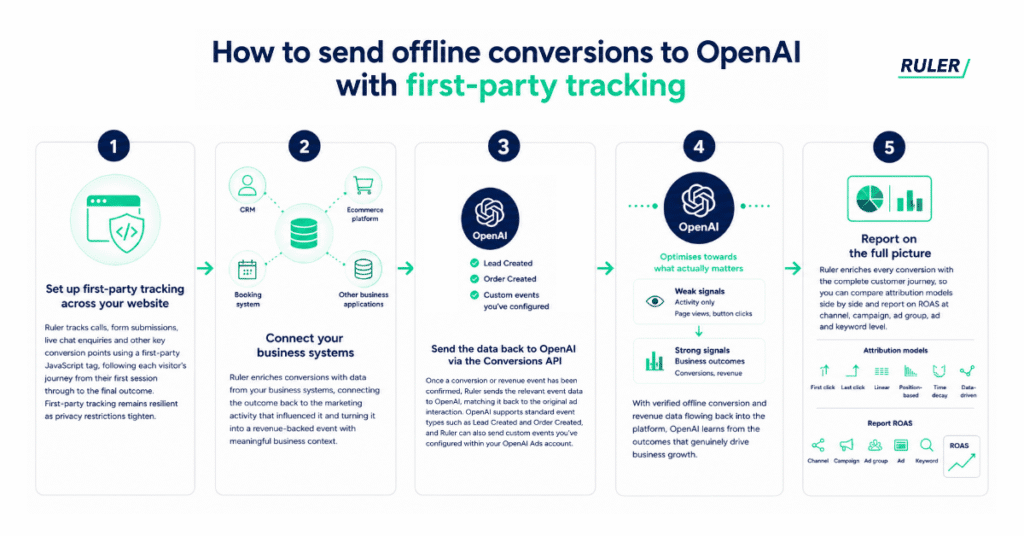
Set up first-party tracking across your website. Ruler tracks calls, form submissions, live chat enquiries and other key conversion points using a first-party JavaScript tag, following each visitor’s journey from their first session through to the final outcome. As the tracking is first-party rather than reliant on third-party cookies, it remains resilient as browser privacy restrictions continue to tighten.
Connect your business systems. Once a conversion takes place, Ruler enriches it with data from your CRM, ecommerce platform, booking system or other business applications. Whether the outcome is a qualified lead, completed purchase, signed contract or confirmed booking, you can connect it back to the marketing activity that influenced it. This transforms a simple conversion into a revenue-backed event with meaningful business context.
Send the data back to OpenAI via the Conversions API. Once a conversion or revenue event has been confirmed, Ruler sends the relevant event data to OpenAI, matching it back to the original ad interaction. OpenAI supports standard event types such as Lead Created and Order Created, and Ruler can also send custom events you’ve configured within your OpenAI Ads account.
Let OpenAI optimise towards what actually matters. With verified offline conversion and revenue data flowing back into the platform, OpenAI’s optimisation has far more meaningful signals than page views or button clicks. Instead of bidding towards activity alone, it can learn from the conversions and revenue outcomes that genuinely drive business growth.
Report on the full picture. Because Ruler enriches every conversion with the complete customer journey, you’re not limited to a single attribution model. Compare first click, last click, linear, position-based, time decay and data-driven attribution side by side, and report on ROAS at channel, campaign, ad group, ad and keyword level. For a channel as new as OpenAI Ads, that flexibility is especially valuable, as customer behaviour within ChatGPT continues to evolve and a single attribution model is unlikely to tell the whole story.
💡 Pro tip
Getting your offline data matched cleanly to the right ad click is the part most teams underestimate. Book a demo with Ruler to see how first-party tracking and automated offline conversion syncing can help you improve data quality and give OpenAI better optimisation signals.
If you want to see how this fits into a wider marketing attribution strategy, or you’d like more detail on the mechanics of offline conversion tracking generally, both are worth a read alongside the OpenAI specific setup guide.
Need help setting up OpenAI offline conversions?
Like every ad platform before it, OpenAi’s native reporting only tells part of the story. The conversions that happen away from the browser, on the phone, in the CRM, weeks after the initial click, are where a lot of the real value sits, and they’re invisible unless someone is actively sending that data back.
Offline conversion tracking closes that gap. By connecting first-party website tracking to your CRM and feeding verified conversion data back into OpenAI’s Conversions API, you give the platform what it needs to optimise towards genuine business outcomes, and you give yourself a much clearer answer to the question every marketing leader eventually has to answer, which is whether the spend is actually working.
If you’d like help setting this up for your own campaigns, we’re always happy to talk it through. Book a demo with Ruler Analytics and we’ll show you what it looks like with your own data.