

Ad platforms double counting conversions is one of the most widespread and expensive measurement problems affecting marketing teams.
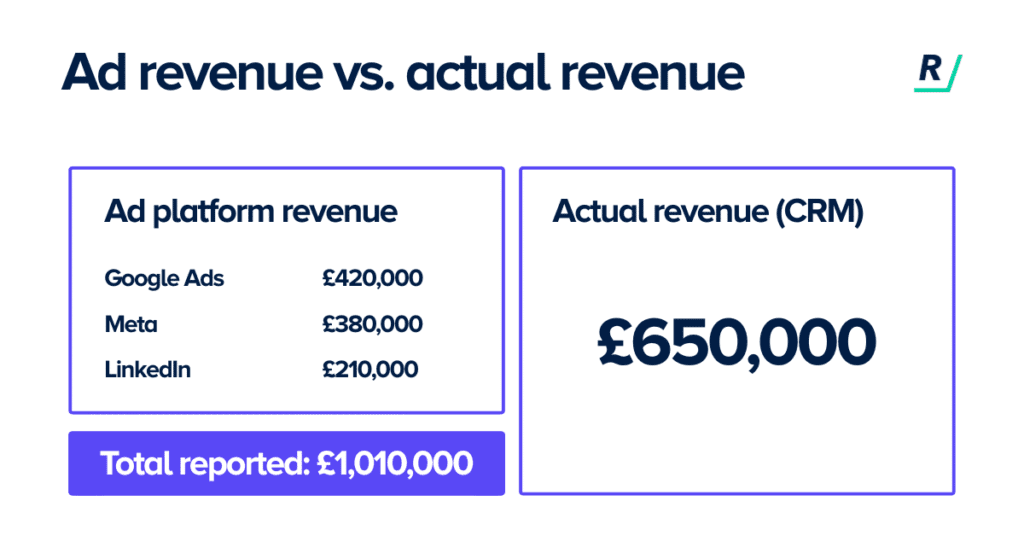
When you open your ad dashboards, Google Ads reports 80 conversions, Meta Ads Manager shows 65, and Microsoft Advertising claims another 30, which on paper adds up to 175 conversions.
However, when you cross-check this against your backend data, you find that only 95 actual sales were recorded, revealing an 84% overcount that has a direct impact on how marketing budgets are allocated.
Double-counting conversions is a pervasive but often overlooked issue in digital marketing, arising when multiple platforms claim credit for the same conversion due to differences in tracking logic and attribution models.
While each platform is reporting accurately according to its own methodology, the combined effect inflates key performance metrics, such as return on ad spend (ROAS) and cost per acquisition (CPA), making underperforming channels appear more profitable than they actually are and skewing budget allocation decisions.
In this article, we explore how to identify double-counted conversions and outline practical steps to address them effectively.
We discuss:
- Why ad platforms double count conversions
- The real cost of conversion duplication
- How to deal with conversion duplication
- What happens when you resolve it
Key takeaways
Ad platforms count conversions independently, the same sale can be claimed by Google Ads, Meta, and Microsoft Ads simultaneously.
When combined platform conversions significantly exceed actual backend revenue, cross-platform duplication is almost certainly the cause.
Double-counting inflates reported ROAS and hides your true cost-per-acquisition, sometimes by close to 2x.
The most common causes are missing transaction IDs, incorrect conversion counting settings, and pixel plus server events firing without deduplication logic.
Your CRM or e-commerce backend is your only reliable source of truth, platform dashboards are directional signals, not budget decisions.
Why ad platforms count the same conversion more than once
Each ad platform operates its own measurement system in complete isolation. Google Ads tracks conversions from Google clicks. Meta tracks conversions from its Pixel and Conversions API. Microsoft Ads does the same. None of them share data or cross-reference each other by default.
So when a customer clicks a Google Search ad on Monday, sees a Meta retargeting ad on Wednesday, and buys on Friday, all three platforms can claim that sale. Google says it happened because of the Search ad. Meta says it happened because of the retargeting ad. Microsoft, if there was a touchpoint there too, may claim it as well.
This is structural. It isn’t a bug or a configuration error. It’s simply how each platform’s measurement model works, they each measure within their own ecosystem, and they have every incentive to do so.
There is also a second layer of overlap involving view-through conversions.
Some platforms count a conversion if a user simply saw an ad, even without clicking, and later purchased through a different channel. A customer who clicked a Google Search ad and saw a Meta display ad in the same day can trigger a reported conversion in both systems.
We reviewed conversion data across a range of e-commerce accounts and found that when you aggregate all platform-claimed conversions and compare them against actual backend revenue, the gap is rarely small.
In many cases, platforms were collectively claiming 30–50% more conversions than actually occurred.
The real cost of letting this go unfixed
Here’s where double-counting stops being a data problem and becomes a budget problem.
Your ROAS figures are built on those conversion numbers. If actual sales are 95 but combined platform reporting shows 175, your ROAS looks almost twice as strong as it actually is.
Related: What is Google ROAS and why you need to be cautious
And because ad platforms use conversion data to optimise bidding, they’re bidding more aggressively than they should, pushing up costs based on performance signals that don’t reflect reality.
The downstream effects compound quickly:
- Budget goes to the wrong places: Channels that appear to generate a strong return receive more investment. If that return is partly built on duplicated conversions, the incremental value is much lower than reported. You end up scaling on inflated numbers.
- True cost-per-acquisition stays hidden: If your actual CPA is close to double what the platform shows, you may already be operating below profitability without knowing it.
- Finance loses trust in marketing: When a CFO looks at actual revenue and it doesn’t match what the marketing dashboard reports, the credibility gap makes it harder to approve budgets for genuine growth.
We worked with an e-commerce business scaling Facebook spend based on a reported ROAS of 7–8x. When we compared platform-claimed conversions against actual backend orders, Facebook was over-attributing by roughly 40%.
Their true cost-per-acquisition was almost twice what the platform showed. Redistributing budget to channels with cleaner attribution improved overall margin without increasing total spend.
The most common causes of duplicate conversions (and what you can actually fix)
Not all conversion duplication is the same. Some of it comes from technical mistakes in your tracking setup that can be resolved with relatively straightforward changes. But some of it is structural, baked into how ad platforms measure independently, and no amount of tag fixing will solve it. It helps to know which is which.
Related: Why GA4 and ad platform data don’t match and what to do
Duplication caused by tracking errors (fix these first)
Generally, these errors are fixable. Cleaning them up will give you more reliable numbers within each platform and is worth doing regardless of anything else.
- Multiple tags firing for the same event. If your purchase confirmation page has both a Google Ads tag and a GA4 tag configured as conversion events, and you’ve also imported GA4 events into Google Ads, the same purchase registers as two separate conversions within a single platform. This happens frequently after website updates or when new tracking is added without auditing what’s already in place.
- “Every conversion” counting instead of “one per click”. Google Ads lets you choose how conversions are counted, every time the event fires, or once per click. For purchase events, counting “every conversion” means a user who reloads the thank-you page generates two conversions from one order. For e-commerce transactions, “one per click” is almost always the correct setting.
- No transaction IDs to deduplicate purchases. Without a unique transaction ID passed through your conversion tag, a platform can’t distinguish between a genuine repeat purchase and a page reload. Google Ads recommends using order confirmation numbers as transaction IDs, but many setups still don’t include them.
- Pixel and Conversions API firing without deduplication logic. As more advertisers run Meta’s Conversions API alongside the browser Pixel, there’s a risk of the same conversion being sent twice, once from the browser, once from the server. Meta has deduplication logic built in, but it only works when you pass a consistent event ID across both. Without it, purchase counts in Ads Manager get inflated.
Duplication that fixing your setup won’t solve
The important caveat is that even with a technically clean tracking setup, you will still see conversion totals that exceed your actual sales when you look across platforms together.
As we discussed earlier, each platform has its own measurement logic, its own attribution windows, and its own definition of what counts as a conversion.
Google Ads measures from Google clicks. Meta measures from Meta touchpoints. When a customer interacts with both before buying, which is common, both platforms record the conversion legitimately within their own system.
Neither is wrong by its own rules. But together they’re overcounting.
This is the structural overlap problem, and it doesn’t go away when your tags are clean. It requires a different approach entirely.
The goal here isn’t perfect data, that’s not realistic. The goal is data you can make confident decisions with.
- Use your CRM or e-commerce backend as the anchor. Every reporting view should start with actual revenue. Platform numbers sit alongside it as directional signals, not the truth. A simple weekly reconciliation between backend revenue and combined platform totals shows you how much structural overlap exists in your system.
- Build a unified reporting layer. Aggregating data from all platforms and deduplicating against your backend transaction data gives you the most complete picture. This is the methodology Ruler Analytics is built around, rather than relying on what each platform claims, it:
- Tracks clicks deterministically across multiple touchpoints for direct-response channels, so credit follows actual engagement rather than platform assumptions.
- Fills cookie gaps using machine learning, including Smart Fill Impression Modelling, which estimates the incremental impact of ad exposure, cross-channel halo effects, and brand awareness that never appears in a direct click path
- Models impressions impact probabilistically for awareness channels, so exposure gets measured without forcing it into a click-based framework that doesn’t fit
- Connects website activity directly to CRM revenue, so you can see which channels drive not just leads, but pipeline and closed revenue
The result is a single view of performance that works from what actually happened, with the gaps modelled rather than ignored.
- Change how you make budget decisions. When you have that unified view in place, the way you use data shifts too. As long as you’re logging into Meta to check ROAS and then into Google to do the same, you’re making investment decisions based on each platform’s self-reported performance, which will always overstate their individual contribution. The only figure you can reliably base budget decisions on is one built on your own independent measurement, not what each platform chooses to report.
What changes when you fix it
When reconciliation is in place and attribution is deduplicated, a few things shift quickly.
The gap between marketing’s reported results and finance’s view of revenue stops being a surprise. Budget conversations become more straightforward because everyone is working from the same numbers. And channel investment decisions are made with more confidence because you know what’s actually driving sales, not what each platform is claiming credit for.
The business we referenced reallocated a meaningful portion of budget away from channels that had appeared strong but were largely benefiting from attribution overlap. Organic search and email, which had been under-invested because they don’t self-report ROAS the way paid platforms do, turned out to be significantly more valuable once duplication was removed.
None of this requires a complete overhaul overnight. Start with the reconciliation, backend revenue versus combined platform totals. The gap you find will tell you how urgently the rest needs addressing.
If you want to see how a unified measurement layer works in practice, book a demo with Ruler Analytics and we’ll show you exactly how to build a view of performance your whole business can trust.
Conversion duplication FAQs
Conversion duplication happens when the same sale or lead is counted as a conversion by more than one ad platform, or more than once within a single platform. Because each platform tracks independently, a customer who touched multiple channels before buying can trigger a reported conversion in Google Ads, Meta, and Microsoft Ads simultaneously, even though only one sale occurred.
The most common fixes are: setting purchase conversion actions to “one per click” rather than “every”, adding unique transaction IDs to your conversion tag so page reloads don’t recount the same order, and auditing Google Tag Manager to confirm only one conversion tag fires per event on your thank-you page.
Usually caused by: conversion counting set to “every” rather than “one per click”, missing transaction IDs that allow page reloads to generate duplicates, multiple conversion actions firing for the same purchase, or view-through conversions being counted alongside click-based ones.
Pull total conversions from every ad platform for a set period and compare the combined total against actual transactions in your backend or CRM. If the combined total significantly exceeds real sales, 30% or more is a common signal, cross-platform duplication is likely.
Attribution overlap refers to multiple channels receiving credit for the same conversion, each claiming it legitimately from their own measurement perspective. Double counting can refer to that cross-platform overlap, or to a technical error where a single platform counts one event more than once. Both inflate reported metrics, but they require different solutions.