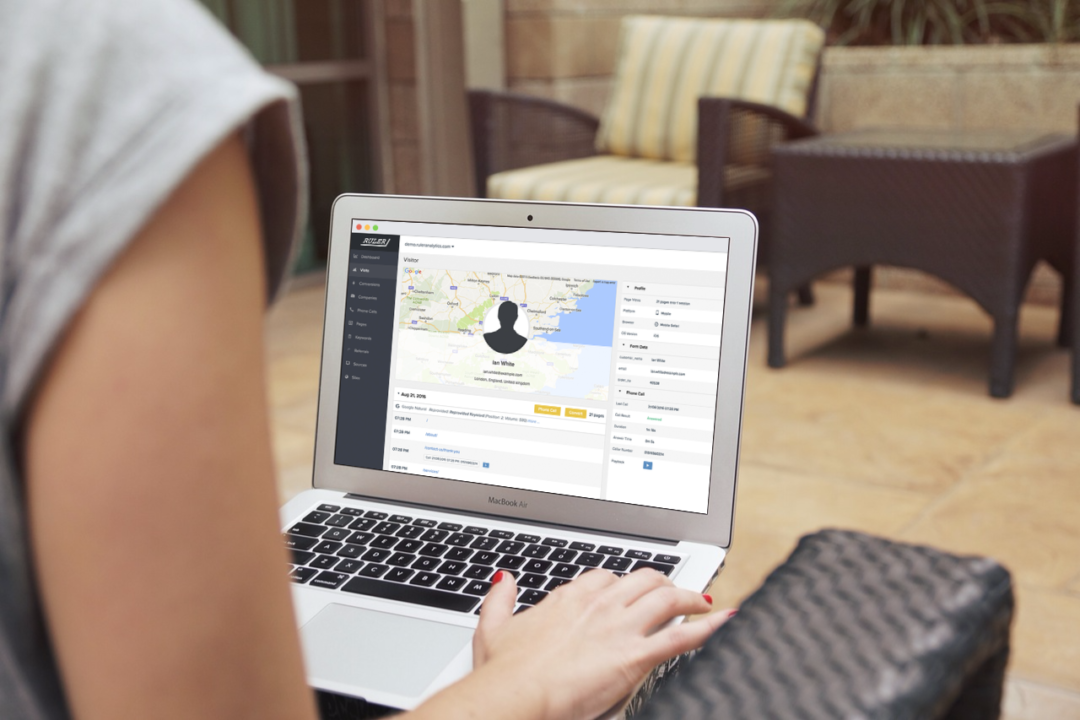


We’ve had this conversation with a lot of marketers. They compare Meta with GA4, see different numbers, and assume something is broken. We discuss what’s actually happening.
If you’ve ever sat in a reporting meeting trying to reconcile Meta’s conversion numbers with what GA4 is showing, you’ll know the feeling.
One platform says one thing, the other says something completely different, and someone asks which one to trust.
This happens to almost everyone running Facebook campaigns alongside GA4. It’s often not a sign that your tracking is broken. The two platforms use different methodologies, measure different things, and report data in ways that were never designed to match perfectly.
Minor differences of 10 to 20% between the two platforms are completely normal. The more meaningful question, the one most guides skip past, is what to do when the discrepancy is large enough to change your read on whether a campaign is working.
That’s where the real problem sits.
Here’s what we’ll cover:
- Why we see Meta and GA4 report different numbers
- How we reduce discrepancies with first-party tracking
- Benchmark data showing what unified measurement reveals
💡 Pro Tip
GA4 and Meta will never fully agree, they’re built on different methodologies and measure different things.
Ruler Analytics works as a separate measurement layer alongside both platforms. It gives you a deduplicated, single source of truth across the full customer journey, tracking individual click paths from first touch to closed deal, matching impressions to downstream conversions through machine learning, and feeding revenue signals back to Meta so the algorithm has something meaningful to optimise against.
Book a demo with Ruler Analytics
Reasons why we see different numbers in Facebook and GA4
There isn’t one reason. It’s several factors, and they tend to stack on top of each other.
| Tracking aspect | Meta Ads | Google Analytics 4 |
| What it tracks | All ad interactions including clicks, likes, shares | Website interactions e.g., sessions, events, conversions |
| Attribution window | 7-day click, 1-day view (default) | 30 to 90 days (configurable) |
| Cross-device tracking | Yes, via logged-in Facebook users | Limited, cookie-based only |
| View-through conversions | Yes | No |
| Cookie dependency | Not required | Fully dependent |
| Privacy impact | Heavily affected by iOS ATT | Less affected, but ITP limits cookie lifespan |
1. Clicks and sessions are not the same thing. Meta has updated its click-through attribution so website conversions now only count link clicks, rather than bundling in likes, shares, comments, and other ad interactions. This should reduce some of the historical mismatch between Meta Ads Manager and GA4. But even with this change, Meta link clicks and GA4 sessions are measuring different events. Meta records a click when someone taps your ad link. GA4 only records a session after the user lands on your website and the tracking script loads successfully. If someone clicks but bounces before the page loads, blocks scripts, or drops due to a slow connection, Meta will count the click while GA4 won’t record a session.
2. Users click the same ad more than once. Not unusual, particularly for higher-consideration purchases where someone comes back to look again. Meta records each click as a separate interaction. GA4 records one session if both clicks happen within the same 30-minute window. The same user, the same ad, but different counts on each platform.
3. The tracking mechanisms work differently. GA4 relies on first-party cookies. If a user has JavaScript disabled, declines cookie consent, or is browsing on a browser that strips tracking, Safari’s Intelligent Tracking Prevention limits cookies to seven days, GA4 can’t record the session at all. Meta doesn’t need cookies to track ad clicks. Users are logged into Facebook, so the platform can attribute interactions across browsers and devices without relying on a cookie being present. Meta records a click, and GA4 records nothing.
Related: How Google Analytics 4 uses cookies to track visitors
4. The tracking code sometimes doesn’t fire in time. Someone accidentally taps a Facebook ad on their phone and closes the tab before the page loads. Meta counted the click. GA4 never had the chance to fire. This is particularly common on mobile, where accidental clicks and slow load times both contribute to sessions that Meta records and GA4 misses.
5. The attribution windows are completely different. By default, Meta attributes conversions within a 7-day click window and a 24-hour view window. GA4’s lookback window for acquisition events is 30 days, with up to 90 days available for other conversion events. The same conversion can fall inside one platform’s window and outside the other’s depending entirely on when it happened relative to the ad interaction. For businesses with sales cycles longer than a week, which is most B2B businesses and many higher-value B2C ones, this creates a consistent and significant gap in conversion counts.
6. Meta includes view-through conversions. When someone sees a Facebook ad, doesn’t click, and later converts through another channel, Meta will attribute that conversion to the ad they viewed. GA4 has no impression modelling, it only tracks sessions that result from a click. So Meta credits the impression. GA4 credits organic search or direct. The same conversion, attributed differently by each platform, and no way to reconcile them without a third measurement layer.
Related: Mastering view-through attribution tracking—your pro guide
7. Meta can assign multiple conversions to the same user. As a people-based platform, Meta can credit the same person with multiple conversion events across a journey. GA4 assigns one conversion per session. For businesses with repeat purchases or multi-product funnels, this compounds the discrepancy significantly.
8. Incorrect pixel installation. A common setup mistake is placing the Facebook pixel on the landing page linked in the ad rather than on the thank you page or confirmation page that a converted user reaches. Most users won’t convert on their first visit, so a pixel on the landing page fires for everyone. A pixel on the conversion confirmation page fires only for people who actually completed the action. The placement changes what gets counted.
9. Apple’s iOS changes. App Tracking Transparency, introduced with iOS 14.5, requires apps to get explicit permission before tracking users across other platforms. A significant proportion of iOS users opt out. When they do, Meta loses visibility into their off-platform behaviour, which means conversions from those users may go unattributed in Meta Ads Manager entirely. GA4 is somewhat less affected since it operates through your website rather than relying on app-level tracking, but Apple’s ITP still limits cookie lifespan and affects cross-session attribution.
How we to reduce the discrepancies between GA4 and Meta
The more useful goal, the one that actually changes how you make decisions, isn’t perfect reconciliation between two platforms. It’s having a single, deduplicated source of truth that you can trust independently of either one.
Add UTM parameters to every Facebook ad
Auto-tagging isn’t available on Facebook, which means you have to add UTM parameters manually.
Use Google’s Campaign URL Builder. Set the source as “facebook” and the medium as “paid.” Don’t use “cpc”, GA4 interprets that as paid search, and your Facebook traffic will get folded into your Google Ads data. Make sure everything is lowercase; UTM parameters are case-sensitive and capitalisation inconsistencies create duplicate source entries in GA4.
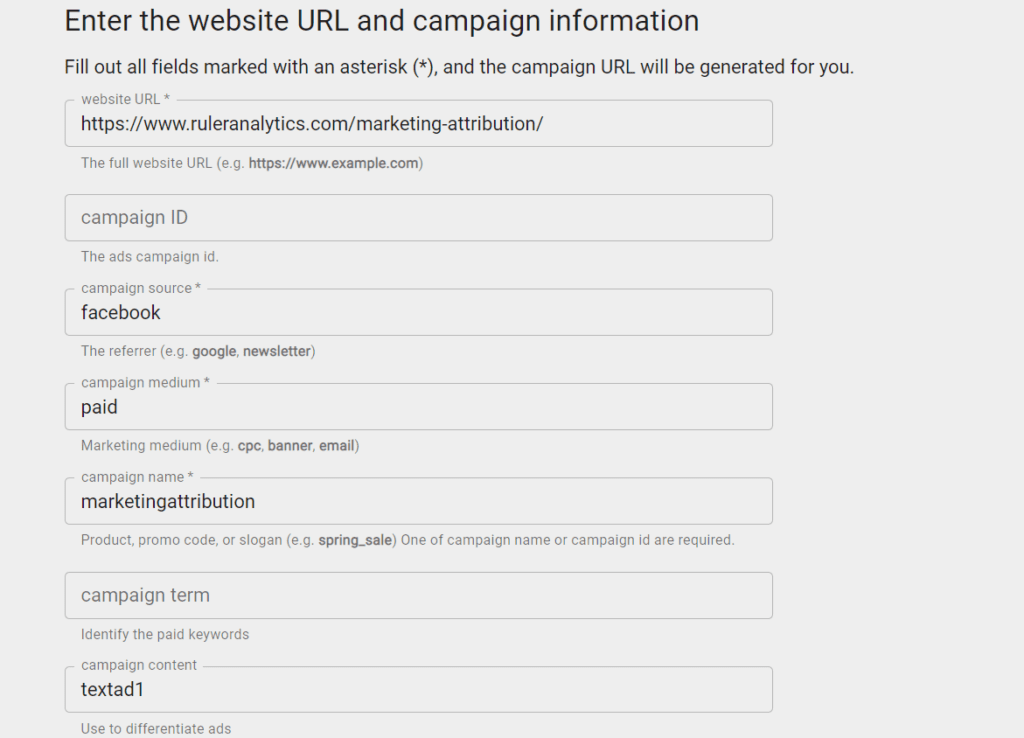
UTM parameters won’t fix the discrepancy between Facebook’s click count and GA4’s session count. What they will do is ensure that the Facebook traffic GA4 does capture is correctly attributed to Facebook rather than appearing as Direct or Unassigned.
Build a deduplicated single source of truth with first-party attribution
The more fundamental issue is that you’re trying to reconcile two platforms that were never designed to agree.
Meta reports from its own perspective. GA4 reports from its own. Neither has the full picture, and comparing them will always produce friction.
What actually helps is stepping outside both platforms and building a separate measurement layer that operates independently.
First-party attribution tools like Ruler sit between your website, your CRM, and your ad platforms. They track each visitor across sessions and touchpoints using first-party data, no third-party cookies, no dependence on Meta’s pixel or GA4’s session logic.
When a visitor converts via a form, phone call, or live chat, Ruler matches that conversion to the full sequence of marketing touchpoints that preceded it and sends a unified, deduplicated record to your CRM.
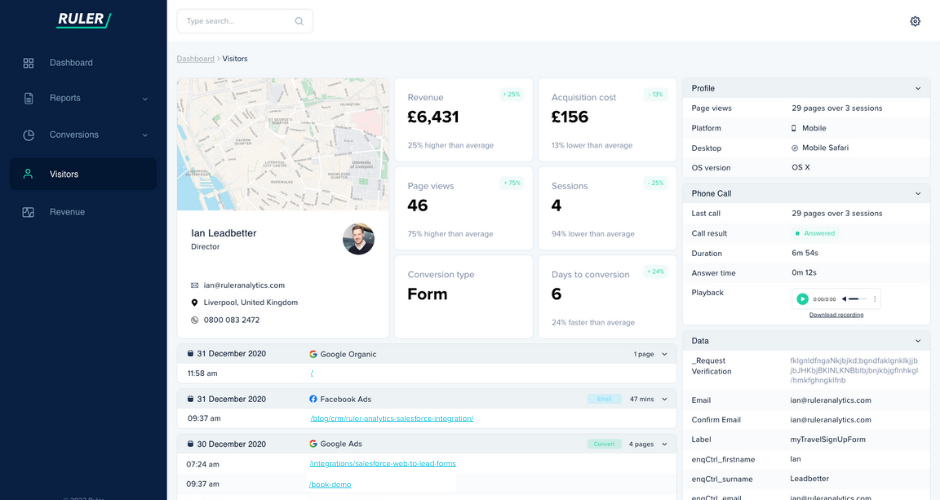
That record is your single source of truth. It doesn’t contradict GA4 or Meta, it operates alongside them. You can see which specific Facebook campaigns contributed to closed revenue, how many touchpoints preceded each conversion, and how long the journey actually took.
When a deal closes, weeks or months later, the revenue maps back to the contributing channels without a 90-day cutoff or a platform-side attribution model getting in the way.
Ruler also captures FBCLID and GCLID using first-party cookies, which feeds accurate conversion data back to Meta Ads Manager.
Related: First-party data activation—smarter path to better ad targeting
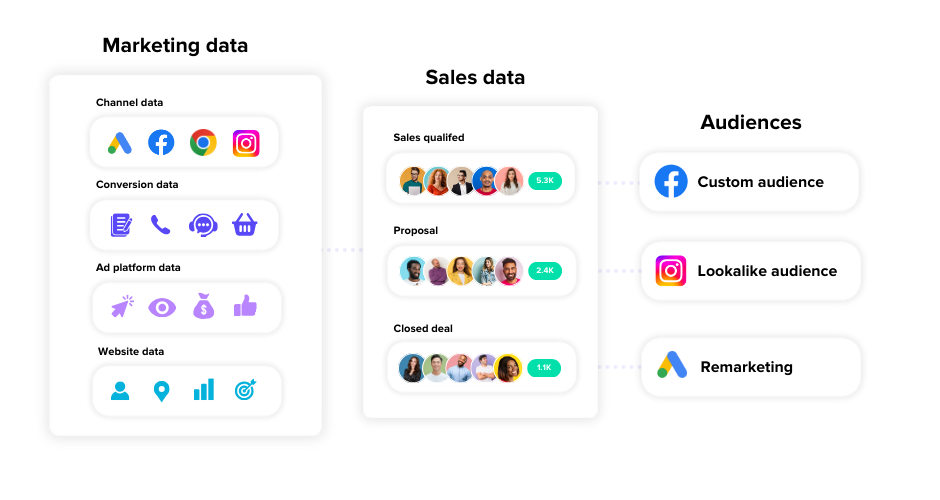
This gives the algorithm stronger signals to optimise against rather than just clicks or page views.
The measurement gap we’re seeing before anyone clicks
We know first-party attribution gives you a deduplicated, unified view of individual journeys that neither GA4 nor Meta can provide on their own.
However, it still operates within a click-based world. It tracks sessions, touchpoints, and conversions that resulted from someone clicking something and landing on your site.
It isn’t built to capture the full contribution of channels that operate primarily through impressions, which is exactly how Facebook prospecting campaigns tend to work.
Facebook prospecting, where someone sees an ad, doesn’t engage immediately, and returns later through search or direct, that missing impression is often where the real influence sits.
The result is that upper-funnel Facebook activity may not be fully captured, and that’s what drives the kind of budget conversations where a channel generating a genuine positive return looks like it’s doing nothing.
Related: Understanding the difference between click and impression measurement and what to trust
We’ve seen this directly in our benchmark data. Across a set of paid channels, we compared last-click ROAS against marketing mix modelling outputs. The gap was significant enough that acting on last models in tools like GA4 alone would have led to the wrong budget decisions.
| Channel | Last Click ROAS | Data-Driven ROAS | MMM ROAS | MMM Marginal ROAS |
| TikTok Prospecting | 0 | 2.86 | 2.1 | 1.4 |
| Facebook Prospecting | 0 | 2.55 | 4.1 | 2.6 |
| Instagram Prospecting | 0 | 2.35 | 2.3 | 1.2 |
| Google Pmax | 0.6 | 0.87 | 2.3 | 0.9 |
| Google Non Brand | 0.4 | 0.8 | 1.2 | 0.4 |
Every prospecting channel, Facebook, TikTok, Instagram, showed a last-click ROAS of zero. On that data alone, cutting all three looks like the rational move.
Marketing mix modelling tells a completely different story. Facebook Prospecting at 4.1x. TikTok at 2.1x. Instagram at 2.3x. These are positive returns on channels that last-click attribution said were contributing nothing.
The gap exists because MMM captures what click-based measurement can’t, the contribution of impressions, cross-channel influence, and the upper-funnel activity that shapes decisions made later through other channels.
Related: How marketing mix modelling transforms budget planning
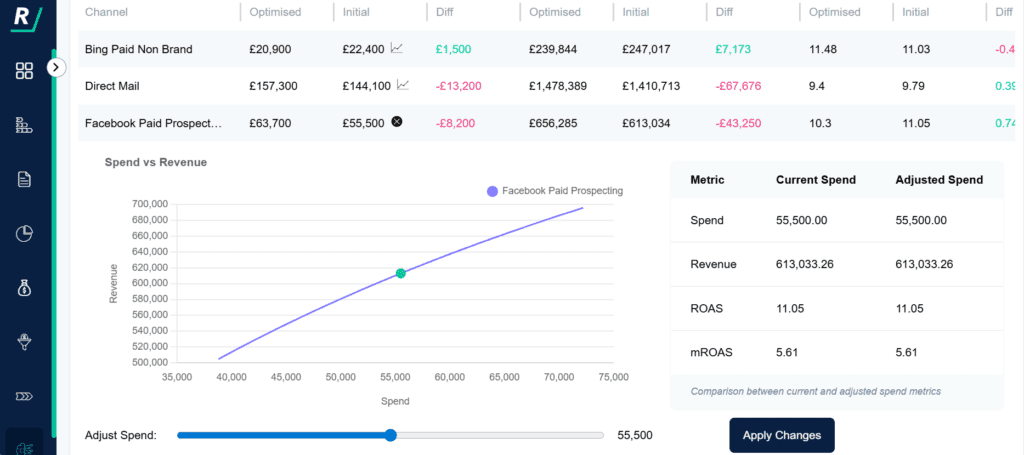
These are benchmarks rather than data from a single account, but the pattern holds consistently. Upper-funnel prospecting channels are almost always undervalued by click-based attribution, and Facebook in particular tends to show the largest gap between last-click and MMM outputs.
Our final thoughts on GA4 and meta discrepancies
The discrepancy between Meta and GA4 is real, persistent, and only partially fixable. Understanding why it exists, and which parts of it are just noise versus which parts are actually changing your read on performance, is more valuable than chasing a perfect match between the two platforms.
GA4 is a good tool for understanding website engagement. It’s not a reliable tool for evaluating the revenue contribution of upper-funnel Facebook campaigns, making budget decisions across your full channel mix, or understanding what’s happening between a click and a closed deal.
The more complete picture comes from combining GA4 with first-party attribution for individual journey tracking, and MMM for channel-level contribution and budget optimisation. That combination answers the questions that matter most, not just where traffic came from, but what it was actually worth.
Ready to improve the quality of your reporting in Meta and Analytics? Book a demo of Ruler Analytics and start attributing revenue directly to your advertising efforts.
Google Analytics 4 & Facebook discrepancies FAQs
Discrepancies happen because the platforms track and attribute activity differently. Google Analytics uses data-driven attribution by default, while Facebook uses a last-click model and may credit the same action to a view-through. Attribution windows vary, and GA4 doesn’t track impressions or view-through conversions, making totals appear inconsistent.
There are multiple causes why Facebook conversions and GA4 data don’t match: Facebook uses different attribution windows, includes view-through conversions, and may assign multiple conversions to the same user. GA4 relies on user-initiated sessions and excludes view-based data. iOS 14.5 has also limited Facebook’s ability to track users accurately across devices.
Neither is universally more accurate. The Facebook pixel and Google Analytics measure different things. Facebook Pixel focuses on ad performance within Meta platforms. GA4 gives a broader view of on-site behaviour. Since iOS 14.5, Facebook Pixel has faced more restrictions, particularly for tracking across devices and capturing conversion paths.
Yes, provided you use UTM parameters on your Facebook ad links. GA4 can track users who click from Facebook to your website. It cannot track in-app engagement such as likes or shares, nor can it capture view-through data from Facebook ads.
First-party tracking tools can fix tracking discrepancies between Facebook and GA4. Ruler Analytics captures click IDs, cookies, page views, and other first-party data. It links this information to real outcomes like revenue, allowing you to see how Facebook campaigns influence pipeline and sales, beyond what GA4 or Meta reports on their own.
There are a few differences between Facebook Pixel and GA4. Facebook Pixel is built for ad tracking and optimisation on Facebook and Instagram. It focuses on ad views, clicks, and conversions. Google Analytics tracks broader website performance, including traffic sources, user journeys, and on-site actions. Each tool serves a different part of the marketing stack.